What Is Middleware in Node.js? A Complete Guide with Examples
Learn what middleware is in Node.js and Express.js, how req, res, and next() work, different middleware types, authentication, validation, error handling, and practical examples.

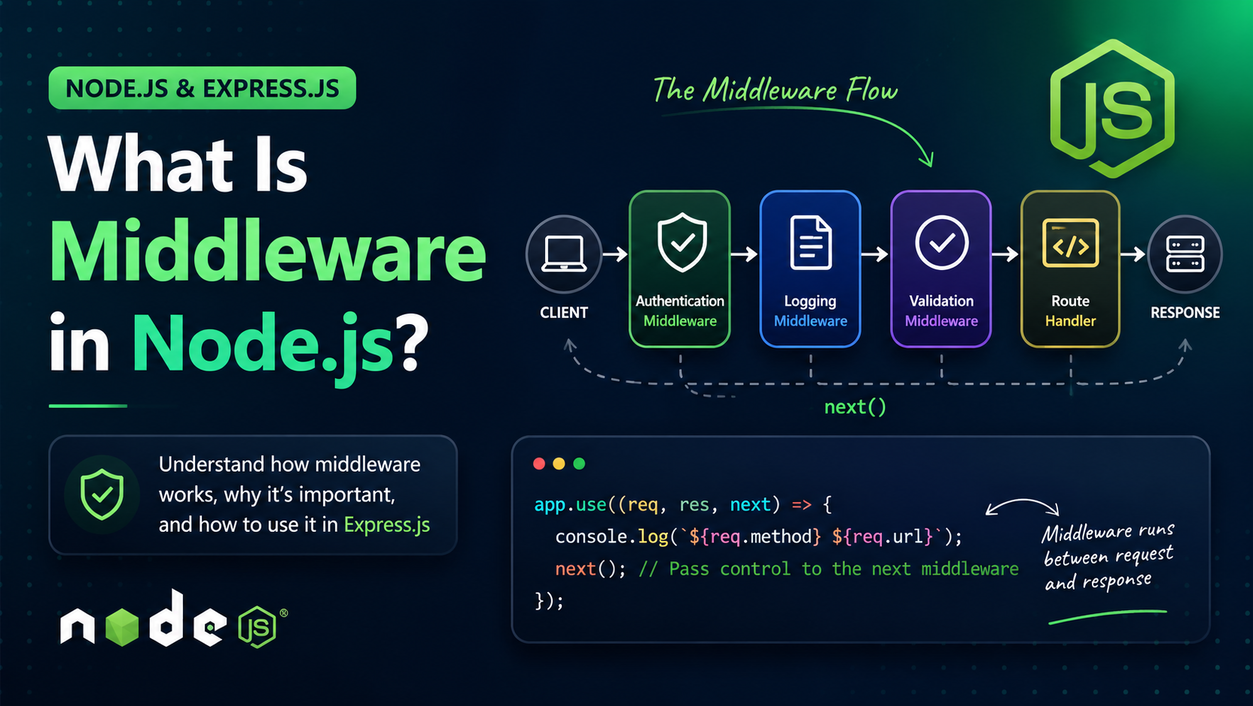
When building web applications or APIs with Node.js, you will often need to perform common tasks before a request reaches your actual route handler.
For example, you may need to:
- Check whether a user is authenticated
- Log incoming requests
- Validate request data
- Parse JSON request bodies
- Check permissions
- Add information to the request
- Handle errors
- Modify the response
- Protect APIs from unauthorized access
This is where middleware becomes useful.
In this guide, we will explain what middleware is in Node.js, how middleware works, what req, res, and next mean, the different types of middleware in Express.js, and how to create your own middleware with practical examples.
What Is Middleware in Node.js?
Middleware is a function that runs during the request-response cycle of a web application.
In Node.js applications, middleware is most commonly associated with frameworks such as Express.js.
An Express middleware function has access to three important things:
(req, res, next)
Where:
reqrepresents the incoming request.resrepresents the response that will be sent to the client.nextis a function used to pass control to the next middleware or route handler.
Express describes middleware as functions that can execute code, modify the request or response objects, end the request-response cycle, or pass control to the next middleware.
A simple middleware looks like this:
const middleware = (req, res, next) => {
  console.log("Middleware executed");

  next();
};
The important part here is:
next();
Calling next() tells Express to continue processing the request.
How Does Middleware Work?
It is easier to understand middleware by looking at the request flow.
Imagine a user requests:
GET /users
Your Express application might process that request like this:
Client
   |
   v
Incoming Request
   |
   v
Authentication Middleware
   |
   v
Logging Middleware
   |
   v
Validation Middleware
   |
   v
Route Handler
   |
   v
Response
   |
   v
Client
Each middleware gets an opportunity to perform some operation before the request moves forward.
For example:
app.use((req, res, next) => {
  console.log("Request received");

  next();
});
Then:
app.get("/users", (req, res) => {
  res.json({
    message: "Users fetched successfully"
  });
});
The request first passes through the middleware and then reaches /users.
Understanding req, res, and next
One of the most important things to understand about middleware is the following function:
(req, res, next)
Let's understand each part.
1. What Is req?
req stands for request.
It contains information about the request sent by the client.
For example:
app.use((req, res, next) => {
  console.log(req.method);
  console.log(req.url);

  next();
});
If the user visits:
GET
/users
You might get:
GET
/users
You can also access things such as:
req.params
req.query
req.body
req.headers
req.cookies
For example:
app.get("/users/:id", (req, res) => {
  console.log(req.params.id);

  res.send("User requested");
});
If the URL is:
/users/123
Then:
req.params.id
will contain:
123
2. What Is res?
res stands for response.
It is used to send a response back to the client.
For example:
app.get("/", (req, res) => {
  res.send("Hello World");
});
You can also send JSON:
app.get("/api/user", (req, res) => {
  res.json({
    name: "John",
    age: 25
  });
});
Middleware can also end the request by sending a response.
For example:
app.use((req, res, next) => {
  res.status(401).json({
    message: "Unauthorized"
  });
});
In this situation, next() is not called because the middleware has already handled the request.
3. What Is next()?
next() is used to pass control to the next middleware function.
For example:
app.use((req, res, next) => {
  console.log("Middleware 1");

  next();
});

app.use((req, res, next) => {
  console.log("Middleware 2");

  next();
});

app.get("/", (req, res) => {
  res.send("Home Page");
});
When the user requests /, the execution order is:
Middleware 1
      ↓
Middleware 2
      ↓
Route Handler
The order matters because Express executes middleware in the order in which it is loaded.
What Happens If You Don't Call next()?
This is an important concept.
Consider:
app.use((req, res, next) => {
  console.log("Middleware executed");
});
There is no:
next();
and there is also no response such as:
res.send();
The request will not continue.
The client can remain waiting because the request-response cycle has not been completed.
Therefore, middleware generally needs to do one of two things:
Option 1: Continue
next();
Option 2: End the request
res.send("Request completed");
Express's documentation specifically notes that middleware must either end the request-response cycle or call next() to pass control onward.
Creating Your First Middleware
Let's create a simple Express application.
First install Express:
npm install express
Then create an app.js file:
const express = require("express");

const app = express();

const port = 3000;

app.use((req, res, next) => {
  console.log("Middleware executed");

  next();
});

app.get("/", (req, res) => {
  res.send("Hello World");
});

app.listen(port, () => {
  console.log(`Server running on port ${port}`);
});
Start the application:
node app.js
When you open:
http://localhost:3000
the request first goes through the middleware and then reaches the route.
Why Is Middleware Used?
Middleware is useful because it allows you to separate common functionality from your route handlers.
Without middleware, you might repeat the same logic in many routes.
For example:
app.get("/profile", (req, res) => {
  // authentication logic

  // profile logic
});

app.get("/orders", (req, res) => {
  // authentication logic

  // orders logic
});

app.get("/settings", (req, res) => {
  // authentication logic

  // settings logic
});
This creates duplicated code.
Instead, you can create authentication middleware:
const authenticate = (req, res, next) => {
  // authentication logic

  next();
};
Then reuse it:
app.get("/profile", authenticate, (req, res) => {
  res.send("Profile");
});

app.get("/orders", authenticate, (req, res) => {
  res.send("Orders");
});

app.get("/settings", authenticate, (req, res) => {
  res.send("Settings");
});
This makes your application easier to maintain.
Types of Middleware in Express.js
Express applications commonly use several types of middleware.
The major categories include:
- Application-level middleware
- Router-level middleware
- Built-in middleware
- Third-party middleware
- Error-handling middleware
Let's understand each one.
1. Application-Level Middleware
Application-level middleware is attached directly to the Express application using methods such as:
app.use()
For example:
app.use((req, res, next) => {
  console.log("Request received");

  next();
});
This middleware can run for incoming requests handled by the application.
You can also specify a path:
app.use("/api", (req, res, next) => {
  console.log("API request");

  next();
});
Now this middleware is associated with requests under /api.
2. Router-Level Middleware
Router-level middleware works similarly to application-level middleware, but it is attached to an Express router.
For example:
const express = require("express");

const router = express.Router();

router.use((req, res, next) => {
  console.log("Router middleware");

  next();
});

router.get("/users", (req, res) => {
  res.json({
    message: "Users"
  });
});
You can then attach the router to your application:
app.use("/api", router);
This is especially useful for larger applications where routes are divided into separate modules.
For example:
routes/
├── users.js
├── products.js
└── orders.js
Each router can have its own middleware.
3. Built-In Middleware
Express provides several built-in middleware functions.
One of the most commonly used is:
express.json()
It parses incoming JSON request bodies.
For example:
app.use(express.json());
Now your API can process JSON data:
app.post("/users", (req, res) => {
  console.log(req.body);

  res.json({
    message: "User received"
  });
});
If the client sends:
{
  "name": "John",
  "email": "john@example.com"
}
you can access it using:
req.body
Express also provides built-in middleware such as express.static(), express.urlencoded(), express.raw(), and express.text().
4. Third-Party Middleware
You don't always have to write middleware yourself.
Many middleware packages are available through npm.
For example:
npm install cookie-parser
Then:
const cookieParser = require("cookie-parser");

app.use(cookieParser());
Other commonly used middleware packages include middleware for:
- CORS
- Authentication
- Cookies
- Compression
- Logging
- Security headers
- File uploads
- Sessions
Express maintains a list of middleware modules and commonly used third-party middleware.
5. Error-Handling Middleware
Error-handling middleware is different from normal middleware.
It uses four parameters:
(err, req, res, next)
Example:
app.use((err, req, res, next) => {
  console.error(err);

  res.status(500).json({
    message: "Something went wrong"
  });
});
Notice that there are four parameters:
err
req
res
next
Express identifies this as error-handling middleware based on that signature.
A common pattern is:
app.get("/users", async (req, res, next) => {
  try {
    // Some operation

    res.json({
      message: "Users"
    });
  } catch (error) {
    next(error);
  }
});
The error is passed to the error-handling middleware.
Middleware for Authentication
One of the most common real-world uses of middleware is authentication.
For example:
const authenticate = (req, res, next) => {
  const token = req.headers.authorization;

  if (!token) {
    return res.status(401).json({
      message: "Authentication required"
    });
  }

  next();
};
Then use it on a protected route:
app.get("/dashboard", authenticate, (req, res) => {
  res.json({
    message: "Welcome to dashboard"
  });
});
The flow becomes:
Request
   ↓
Authentication Middleware
   ↓
Token exists?
   ↓
   ├── No → 401 Response
   │
   └── Yes
        ↓
     Dashboard
This approach prevents authentication logic from being duplicated across multiple routes.
Middleware for Request Logging
Another common use case is request logging.
const logger = (req, res, next) => {
  console.log(
    `${req.method} ${req.originalUrl}`
  );

  next();
};

app.use(logger);
Now every request can be logged.
For example:
GET /
GET /users
POST /users
DELETE /users/10
This can be useful when debugging APIs and monitoring application behavior.
Middleware for Validation
Middleware can also validate incoming data.
For example:
const validateUser = (req, res, next) => {
  const { name, email } = req.body;

  if (!name || !email) {
    return res.status(400).json({
      message: "Name and email are required"
    });
  }

  next();
};
Then:
app.post("/users", validateUser, (req, res) => {
  res.json({
    message: "User created"
  });
});
The request will reach the route only if the required fields are present.
Modifying the Request Object
Middleware can also add information to the request object.
For example:
const addUser = (req, res, next) => {
  req.user = {
    id: 123,
    name: "John"
  };

  next();
};
Then another middleware or route can access it:
app.get("/profile", addUser, (req, res) => {
  res.json(req.user);
});
The middleware has added data to:
req.user
This pattern is commonly used after authentication to make information about the authenticated user available to later handlers.
Middleware Execution Order
The order in which middleware is registered is very important.
Consider:
app.use((req, res, next) => {
  console.log("First");

  next();
});

app.use((req, res, next) => {
  console.log("Second");

  next();
});

app.get("/", (req, res) => {
  console.log("Route");

  res.send("Hello");
});
The output will be:
First
Second
Route
Express executes middleware in the order in which it is loaded.
Therefore, if you put middleware in the wrong position, it might not execute when you expect it to.
For example:
app.get("/", (req, res) => {
  res.send("Hello");
});

app.use((req, res, next) => {
  console.log("Middleware");

  next();
});
The middleware will not run for that request because the route has already ended the request-response cycle.
Multiple Middleware Functions
You can use multiple middleware functions for a single route.
For example:
const authenticate = (req, res, next) => {
  console.log("Authentication");

  next();
};

const validate = (req, res, next) => {
  console.log("Validation");

  next();
};

app.get(
  "/dashboard",
  authenticate,
  validate,
  (req, res) => {
    res.send("Dashboard");
  }
);
The execution order is:
authenticate
      ↓
validate
      ↓
route handler
This makes it easy to build a processing pipeline.
Middleware vs Route Handler
Middleware and route handlers are closely related, but they have different purposes.
Middleware
Usually performs an operation and then calls:
next();
Example:
const logger = (req, res, next) => {
  console.log("Request");

  next();
};
Route Handler
Usually completes the request by sending a response:
app.get("/", (req, res) => {
  res.send("Hello World");
});
However, Express's middleware model also allows route handlers to participate in the middleware chain. The important distinction is whether the function continues the request or completes it.
A Complete Middleware Example
Here is a small Express application that combines several middleware concepts:
const express = require("express");

const app = express();

const port = 3000;

// Built-in middleware
app.use(express.json());

// Logger middleware
app.use((req, res, next) => {
  console.log(`${req.method} ${req.url}`);

  next();
});

// Authentication middleware
const authenticate = (req, res, next) => {
  const token = req.headers.authorization;

  if (!token) {
    return res.status(401).json({
      message: "Authentication required"
    });
  }

  next();
};

// Protected route
app.get("/profile", authenticate, (req, res) => {
  res.json({
    message: "Profile data"
  });
});

// Error handling middleware
app.use((err, req, res, next) => {
  console.error(err);

  res.status(500).json({
    message: "Internal server error"
  });
});

app.listen(port, () => {
  console.log(`Server running on port ${port}`);
});
This application contains:
express.json()
       ↓
Logger Middleware
       ↓
Authentication Middleware
       ↓
Profile Route
       ↓
Response
This is the basic idea behind middleware-based application architecture.
Common Middleware Mistakes
1. Forgetting next()
Incorrect:
app.use((req, res, next) => {
  console.log("Hello");
});
If this middleware does not send a response, the request will not continue.
Correct:
app.use((req, res, next) => {
  console.log("Hello");

  next();
});
2. Calling next() After Sending a Response
Avoid doing this:
app.use((req, res, next) => {
  res.send("Done");

  next();
});
Once you have completed the response, you generally should not continue the same request through the middleware chain.
Instead:
app.use((req, res) => {
  res.send("Done");
});
3. Incorrect Middleware Order
Middleware registered after a route may not execute for requests that the earlier route has already completed.
Always consider the order in which your middleware is registered.
4. Forgetting return When Ending a Branch
For example:
if (!token) {
  return res.status(401).json({
    message: "Unauthorized"
  });
}

next();
Using return makes it clear that execution should stop after sending the unauthorized response.
How Middleware Improves Node.js Applications
Middleware helps keep applications organized.
Instead of putting everything inside a route:
app.get("/dashboard", (req, res) => {
  // logging
  // authentication
  // authorization
  // validation
  // business logic
  // response
});
you can separate these responsibilities:
Request
   ↓
Logger
   ↓
Authentication
   ↓
Authorization
   ↓
Validation
   ↓
Controller
   ↓
Response
This makes code easier to:
- Read
- Reuse
- Test
- Debug
- Maintain
- Scale
Node.js Middleware vs Express Middleware
It is important to understand one small distinction.
Node.js itself does not require Express middleware.
Middleware is primarily a concept provided by web frameworks such as Express.
You can create an HTTP server directly with Node.js:
const http = require("http");

const server = http.createServer((req, res) => {
  res.end("Hello World");
});

server.listen(3000);
Express provides a middleware-based architecture on top of Node.js.
Express describes itself as a minimal and flexible web framework for Node.js, with middleware as a major part of its architecture.
So when developers talk about "middleware in Node.js", they are very often talking about middleware in an Express-based Node.js application.
Frequently Asked Questions
What is middleware in Node.js?
Middleware is a function that runs during the request-response cycle and can execute code, modify the request or response, end the request, or pass control to another middleware function.
What are req, res, and next?
req is the incoming request, res is the response, and next() passes control to the next middleware or handler.
Why is next() used?
next() tells Express that the current middleware has finished its work and that processing should continue.
What happens if next() is not called?
If middleware does not send a response and does not call next(), the request can remain unfinished.
Can middleware modify req?
Yes. Middleware can add or modify properties on the request object.
Can middleware send a response?
Yes. Middleware can end the request-response cycle by sending a response.
Can multiple middleware functions be used?
Yes. You can use multiple middleware functions globally, on routers, or on individual routes.
What is error-handling middleware?
Error-handling middleware has four parameters:
(err, req, res, next)
It is used to handle errors in an Express application.
Conclusion
Middleware is one of the most important concepts to understand when building Node.js applications with Express.
At its core, middleware is simply a function that sits in the request-response pipeline.
The basic structure is:
(req, res, next)
A middleware function can:
- Execute code
- Read the request
- Modify the request
- Modify the response
- Authenticate users
- Validate data
- Log requests
- Handle errors
- End the request
- Pass control to the next middleware
Once you understand how req, res, and next() work, you can build more organized and scalable Express applications.
Note: You can deploy your Node.js applications for free on https://host.meerasolution.com