What Actually Happens When You Open a Website? From URL to Screen Explained
Ever wondered what happens after you type a URL and press Enter? Follow a web request from DNS and HTTPS to servers, databases, APIs, and browser rendering.


You open Chrome.
You type https://example.com.
You press Enter.
A moment later, the website appears.
That feels almost suspiciously simple.
There was no dramatic loading screen showing thousands of tiny machines waking up. No map appeared showing your request racing across continents. Your computer did not announce, “Hello, I am about to perform approximately a ridiculous number of networking and rendering operations.”
It just opened a website.
But behind that quiet little Enter key is a surprisingly complicated journey.
Your browser has to figure out where the website lives. Your device has to communicate across networks. Domain names have to be translated into IP addresses. Connections have to be established. Security has to be negotiated. Requests have to be created. Servers have to decide what to do with those requests. A CDN might intercept the request and answer it. A load balancer might choose which server should handle it. The backend might call an API, query a database, check authentication, calculate pricing, fetch inventory, and generate a response.
Then, after all of that, your browser finally gets the response.
And even then, it is not finished.
The browser has to parse HTML, build the DOM, process CSS, construct the render tree, calculate layout, paint pixels, execute JavaScript, download additional resources, update the page, and eventually put the final result on your screen.
All because you typed a URL.
So what actually happens when you open a website?
This article follows one request from the exact moment you press Enter to the moment the page becomes pixels on your display. Along the way, we will look at DNS, TCP, TLS, HTTP, CDNs, load balancers, servers, databases, JavaScript, React, Next.js, rendering, performance, and scalability.
Think of it as a guided tour behind the curtain.
Your browser already has the ticket.
We just need to see what happens after the show starts.
1. What Really Happens When You Press Enter?
Imagine you are opening an online store.
You want to see a pair of shoes, so you type:
https://example.com/products?id=123
and press Enter.
Your brain thinks, “Open the product page.”
Your browser thinks something much more complicated.
It first needs to understand the address. Then it needs to determine where that address points. It needs to communicate with the destination. Because the site uses HTTPS, it needs to establish a secure connection. It needs to send a request describing what it wants. Somewhere on the other side, a server needs to receive that request and decide how to respond.
The response might be a static HTML document. It might be generated dynamically. It might come from a CDN cache. It might require multiple database queries. It might trigger calls to separate services. It might involve authentication cookies. It could even be affected by geolocation, experiments, feature flags, or personalization.
Once the response returns, the browser has another job.
It has to turn data into a visual interface.
That means your browser is simultaneously behaving like a network client, a security system, a document parser, a layout engine, a graphics engine, and a JavaScript runtime.
And this is just the first page load.
A modern website may then request dozens or hundreds of additional resources. Images. Fonts. CSS. JavaScript bundles. API responses. Analytics scripts. Icons. Videos. Advertisements. Third-party services. More API calls.
The visible webpage is therefore less like a single file and more like the front door to an entire system.
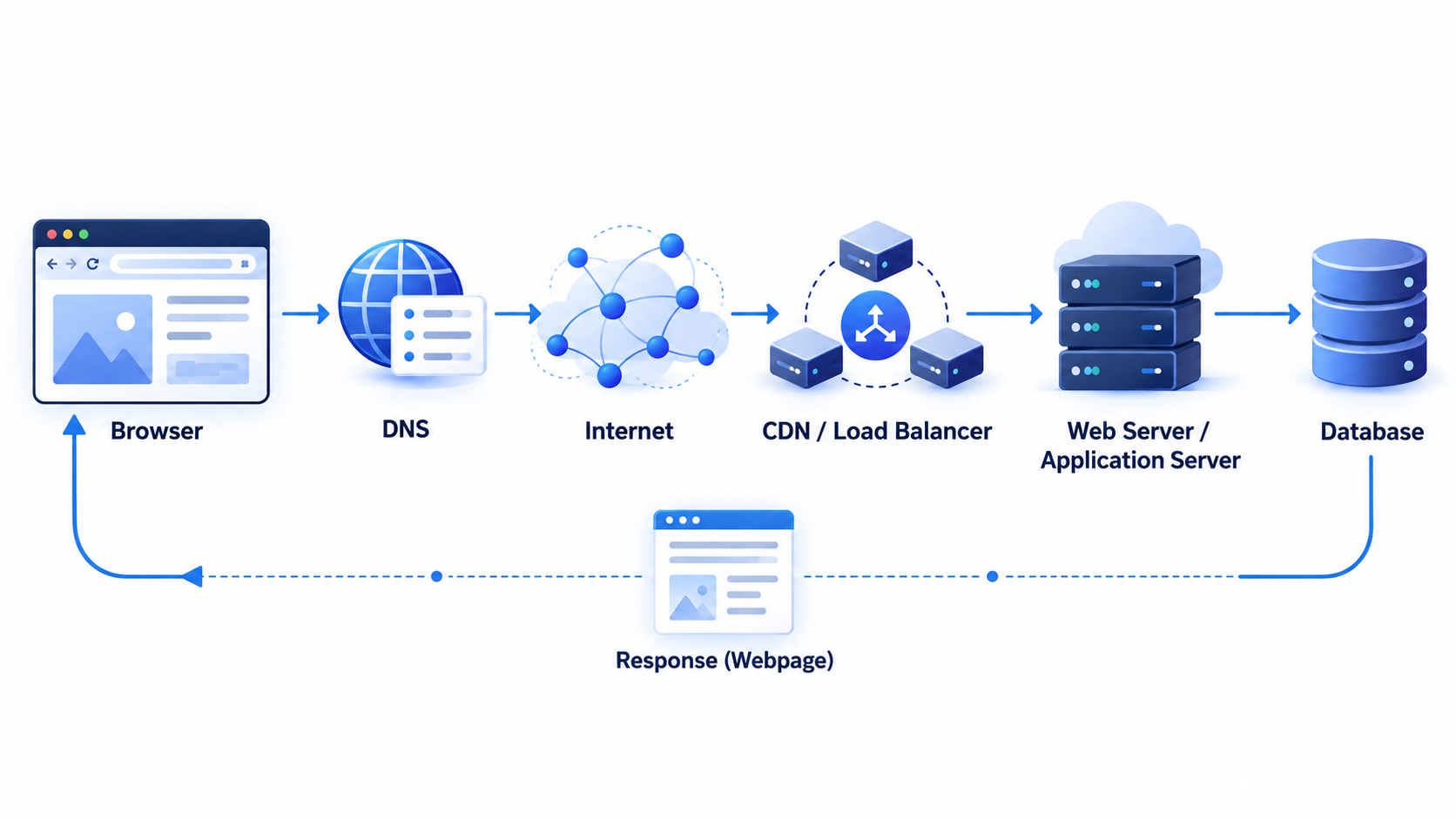
That is the big idea behind understanding what happens when you open a website: the screen is only the final result of a much longer conversation.
2. First Stop: Understanding the URL
Before your browser can do anything with a website, it needs to understand the URL you entered.
Take this URL:
https://example.com/products?id=123
At first glance, it looks like one long string.
To the browser, it is a collection of useful clues.
The https:// part tells the browser which protocol should be used. HTTPS means HTTP is being carried over a secure TLS connection. The browser is not merely asking, “Where is example.com?” It is also being told, “Communicate with this website using a secure connection.”
Then comes example.com.
That is the domain name.
Humans like names because remembering example.com is much easier than remembering something like 203.0.113.42. Computers ultimately need network addresses such as IP addresses, but people naturally prefer names.
After the domain comes /products.
That is the path.
It gives the server more context about what resource the browser wants. A website might have /about, /pricing, /products, /dashboard, /login, or thousands of other paths.
Then there is ?id=123.
That is a query parameter.
In this case, the application can interpret id=123 as “show me product number 123.”
The URL is therefore not just an address. It can also contain instructions about what the user is asking for.
A useful way to think about it is that the URL gives the browser the destination and the server the context.
But there is still one major problem.
The browser knows the name.
It does not yet necessarily know the machine.
That brings us to DNS.
3. DNS: Finding Where the Website Lives
Humans are terrible at remembering IP addresses.
Imagine every morning you had to open your favorite website by typing:
142.250.x.x
instead of its domain name.
You probably would not.
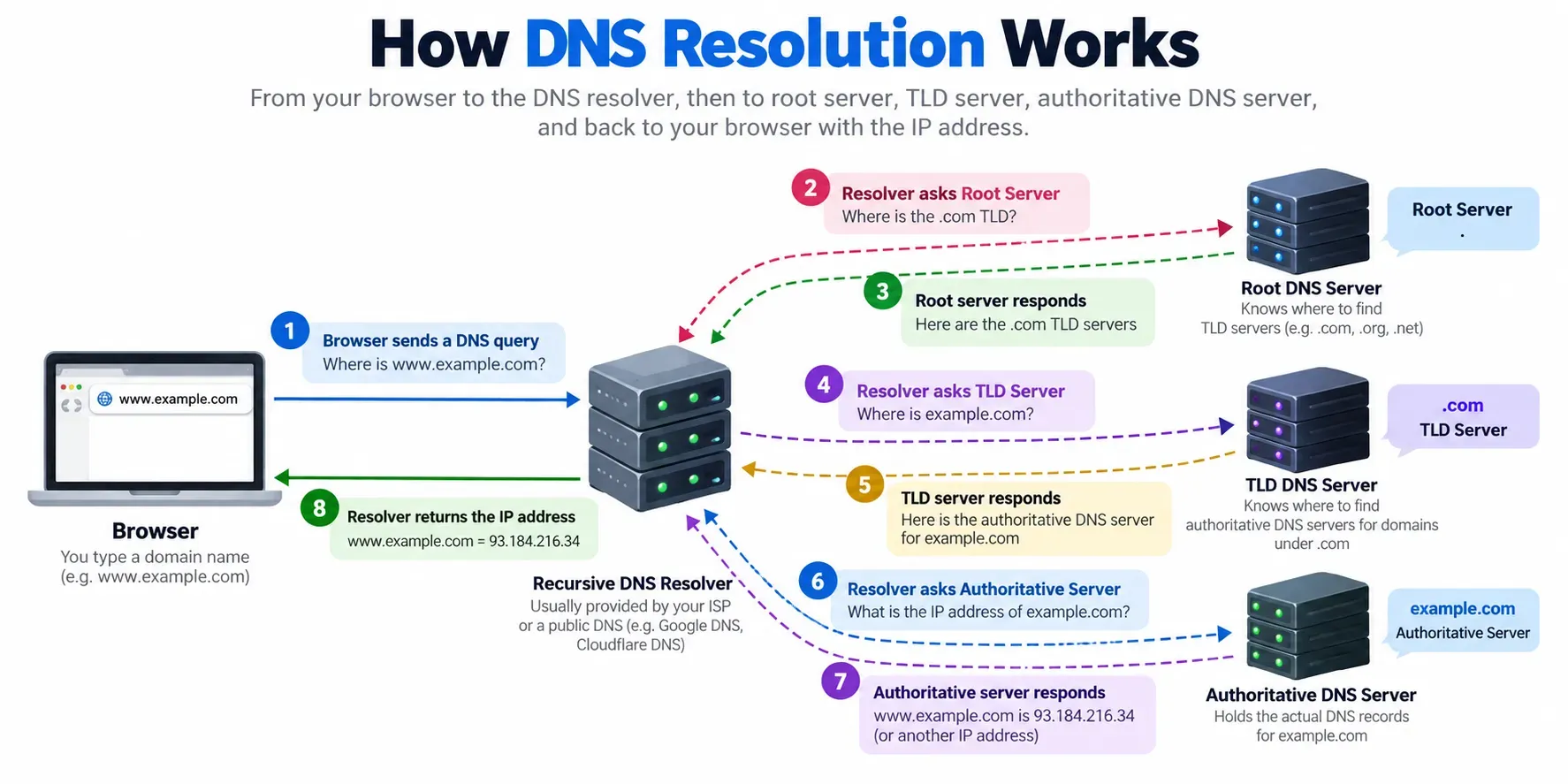
DNS, or the Domain Name System, exists partly because the internet needed a better phone book.
When your browser needs to connect to example.com, it needs to discover which IP address should receive the traffic.
Usually, your device asks a DNS resolver.
That resolver may already know the answer because DNS information is cached.
Caching is important here because asking the entire internet where every domain lives every single time would be absurdly inefficient.
Your browser can have DNS-related information available. Your operating system can have cached information. Your local network can have a cache. The DNS resolver itself can also have cached records.
When the information is not already available, the resolver can perform a recursive lookup.
It may ask a root DNS server where it can find information about the relevant top-level domain. It may then query a TLD server, such as the one handling .com, and eventually reach the authoritative DNS server responsible for the domain.
The authoritative server provides the record that tells the resolver which IP address or addresses are associated with the hostname.
The resolver then returns the result to your device.
Suddenly, your browser has something much more useful than a human-friendly name.
It has a destination.
This sounds like one tiny operation, but DNS can involve several layers of caching, multiple record types, and infrastructure spread around the world.
And there is another interesting detail: the answer is not necessarily just one permanent IP address.
A domain can point to different infrastructure depending on how DNS is configured. Traffic can be directed toward different systems for redundancy, geographic routing, load distribution, or other purposes.
So even before the browser reaches the website, there may already be some intelligent decision-making happening.
Now the browser knows where to go.
Time to travel.
4. Finding the Server
The IP address is known, but your computer is not connected directly to the website server by a magic internet cable.
The request has to travel through networks.
Your device sends data through your local network, possibly through your router, through your internet service provider, and across multiple routers and network segments before reaching the destination.
The actual data is divided into packets.
Packets are small chunks of information that can travel through networking infrastructure toward their destination.
A useful mental image is to imagine mailing a large collection of small envelopes instead of sending one giant box. Each packet contains information that helps the network understand where it belongs and how it should be handled.
Routers examine addressing information and make forwarding decisions.
The interesting part is that you generally do not know the exact physical route in advance.
Your request might travel through several networks and several devices. The route can depend on routing decisions made by the infrastructure at the time.
And the server might not even be physically close to the company whose name is in the URL.
A website may be hosted in one country, use a CDN in another, store its database somewhere else, and use third-party APIs in several additional locations.
To a user, the website feels like one thing.
Technically, it can be a distributed collection of systems.
Before your browser can actually start talking to the destination service, it usually needs a reliable transport connection.
Enter TCP.
5. TCP: Creating a Reliable Connection
TCP, or Transmission Control Protocol, is one of the classic pieces of networking infrastructure that quietly makes the web possible.
Its job is not to understand your website or your product page.
It is concerned with communication reliability.
One of the famous concepts associated with TCP is the three-way handshake.
Very roughly, the client says, “I want to start a connection.”
The server responds, “I received that request and I am ready.”
The client acknowledges, “Great, we are connected.”
This exchange is commonly described using SYN, SYN-ACK, and ACK.
You do not need to memorize the flags to understand the important idea.
The browser and server are agreeing on the beginning of a reliable communication session.
TCP then helps provide ordered, reliable delivery of data.
If information does not arrive correctly, mechanisms exist to detect the problem and recover.
That reliability is extremely useful for HTTP traffic.
But modern web networking has an important twist.
Not every HTTP connection uses TCP.
HTTP/3, for example, uses QUIC, which operates over UDP and provides many transport features in a different way.
So the classic “browser → TCP handshake → HTTPS” explanation is still extremely useful for understanding many connections, but modern browsers can use different transport technologies depending on the situation.
For our journey, imagine that a reliable connection path has been established.
There is one more thing the browser cares about.
Privacy.
6. TLS and HTTPS: Making the Conversation Private
Without HTTPS, sending information across the internet would be a bit like shouting your conversation through a crowded airport.
Other people on the path might potentially observe traffic in ways that should not be possible for sensitive communication.
HTTPS exists to prevent that kind of exposure.
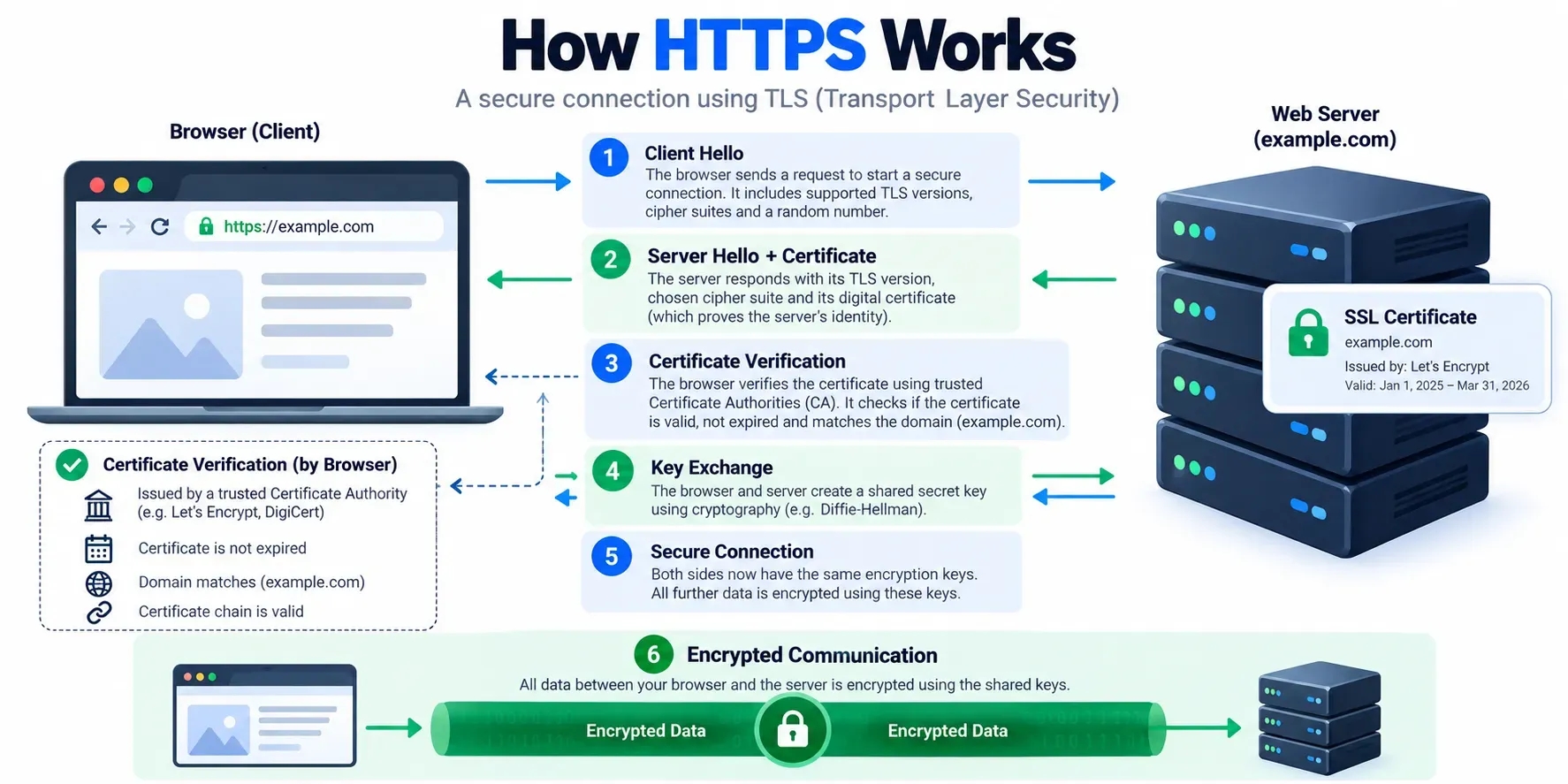
HTTPS uses TLS, the Transport Layer Security protocol, to secure the communication.
When the browser connects to a secure website, the browser and server negotiate cryptographic parameters and establish keys that can be used to protect the data exchanged during the session.
The server also presents a certificate.
The browser uses the certificate as part of the process of verifying that the server is authorized for the domain being accessed and that the certificate chains back to a trusted certificate authority.
There is a lot more cryptography happening here than this simplified explanation suggests, but the key idea is straightforward.
The browser wants to answer two important questions.
“Am I talking to the right website?”
And:
“Can we communicate privately?”
Once the secure connection is established, HTTP traffic can be exchanged inside that protected channel.
That little padlock icon in your browser is therefore backed by some seriously sophisticated mathematics and trust infrastructure.
The funny part is that most users never think about any of it.
They just see a lock.
Underneath it, cryptographic systems are doing a substantial amount of work.
The browser can finally ask for the website.
7. The Browser Finally Sends an HTTP Request
Now we get to one of the most familiar concepts in web development: HTTP.
The browser can send something conceptually similar to:
GET /products?id=123 HTTP/1.1
Host: example.com
Accept: text/html
Real requests contain more information and can use HTTP versions beyond HTTP/1.1, but the basic idea is simple.
The browser is asking the server for something.
In this case, it is essentially saying:
“Please give me the resource represented by this URL.”
The method here is GET.
A GET request is commonly used to retrieve information.
Other methods exist for other kinds of operations. POST is commonly used when sending data to a server to create something or trigger an operation. There are also methods such as PUT, PATCH, and DELETE.
The request can also contain headers.
Headers are pieces of metadata that provide additional information about the request.
The browser can tell the server what content types it accepts, what language preferences it has, information related to caching, cookies, and other contextual details.
Cookies are particularly interesting.
Suppose you are already logged into an online store.
When you open another page, the browser may send authentication-related cookies back to the website. The server can use those cookies to recognize the session.
That is how the server can understand that the request is coming from a particular logged-in browser session rather than an anonymous visitor.
The browser can also provide information about itself through the User-Agent and other client hints.
So even a simple page request is not necessarily just:
“Give me HTML.”
It is more like:
“Give me this resource. Here is the context in which I am requesting it. Here are some preferences. Here is information relevant to the session.”
And now someone on the other side has to respond.
But that someone might not be your main application server.
8. The CDN Might Answer First
Imagine the user is in India and the company's main application infrastructure is hosted primarily in Europe.
Sending every image, stylesheet, JavaScript file, and static asset across long distances would increase latency.
This is one reason CDNs exist.
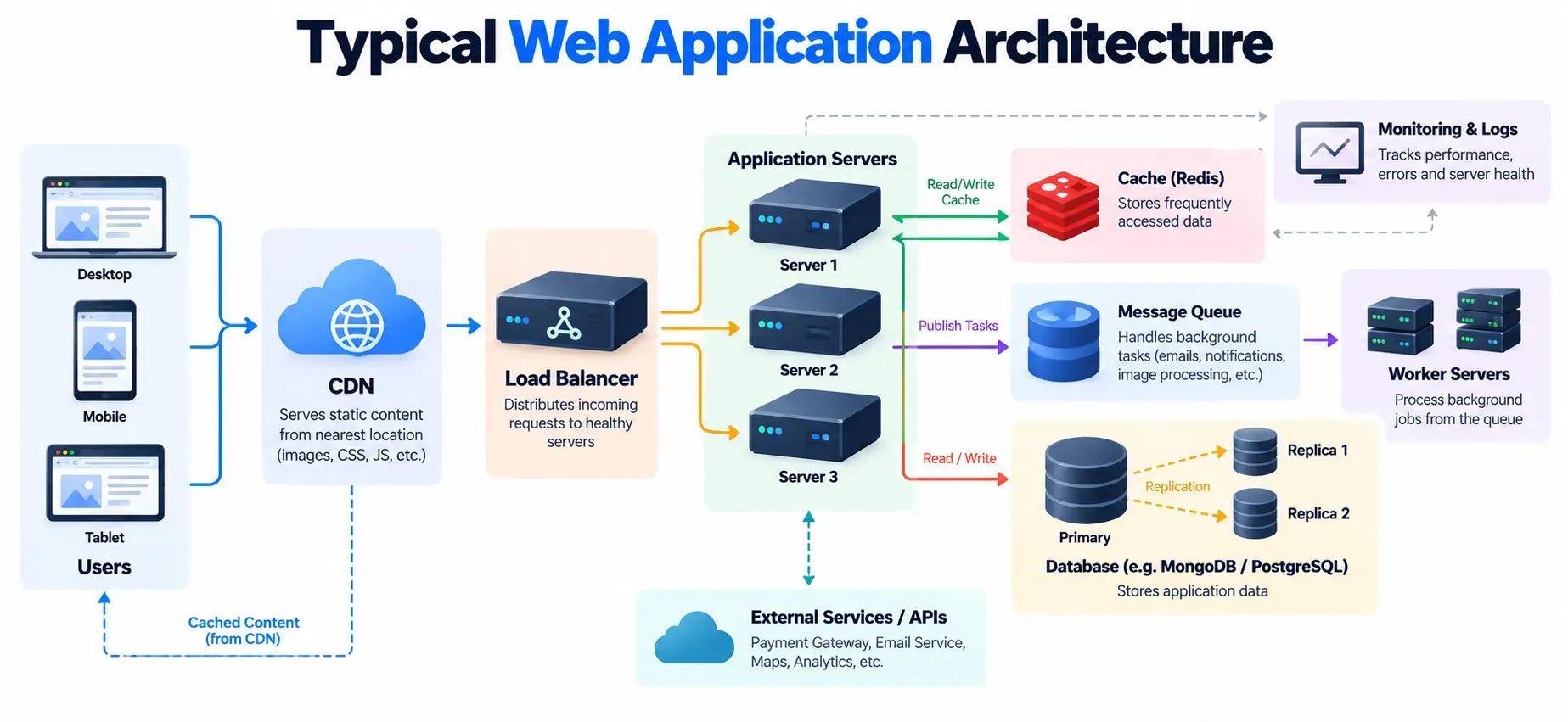
A Content Delivery Network distributes cached content across many edge locations.
When your browser requests a resource, the request can sometimes be answered by a nearby CDN edge instead of traveling all the way to the origin server.
That means the user may receive static resources from infrastructure geographically closer to them.
Suppose a company has a huge image of a product that is identical for every customer.
There is no reason for the main backend application to regenerate or resend that image from the origin server for every single visitor.
The CDN can cache it.
Then thousands or millions of people can potentially receive the same cached content from edge infrastructure.
The same concept can apply to CSS, JavaScript bundles, fonts, videos, and other static resources.
Caching is one of the great recurring themes of web performance.
A system becomes faster when it avoids doing expensive work repeatedly.
Not every request will be served from a CDN cache, though.
Dynamic or uncached content may still need to reach the origin.
And when that happens, the request can encounter another piece of infrastructure.
The load balancer.
9. The Load Balancer Decides Who Handles the Request
Imagine a website with one server.
Now imagine 10,000 people arrive.
That one machine may have a very bad afternoon.
Instead of relying on one server, larger websites can run multiple application instances.
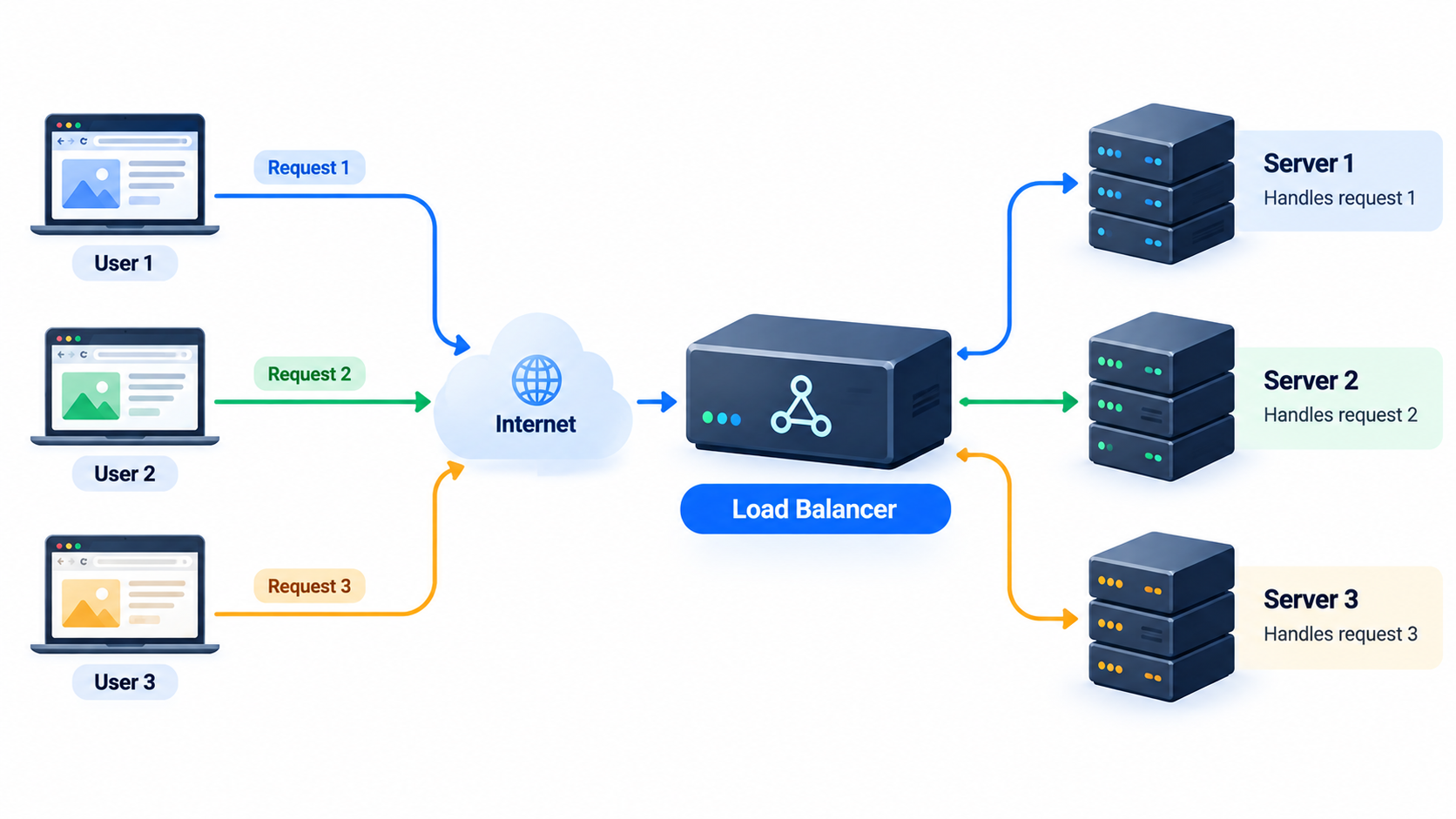
A load balancer sits in front of those servers and distributes incoming requests.
A request might arrive and the load balancer essentially decides:
“Server A is busy.”
“Server B is healthy.”
“Server C has room.”
“Send this request to Server B.”
The exact decision can depend on many strategies.
Load balancers can help distribute traffic, detect unhealthy servers, route connections, and provide a stable entry point to a collection of backend systems.
This is one of those architectural choices that users never see.
When you visit a large website, there might not be one “website server.”
There may be dozens, hundreds, or far more machines working together.
You still type one domain.
You see one page.
The architecture underneath can be enormous.
Eventually, your request reaches an application system that can actually understand what /products?id=123 means.
10. The Web Server Receives the Request
The request has crossed the network and arrived at infrastructure controlled by the website.
A web server such as Nginx might be involved near the front of the stack.
At a high level, a web server can accept network connections, handle HTTP traffic, serve static content, proxy requests, and pass dynamic work to application servers.
This distinction matters because the software receiving an HTTP request does not necessarily contain all of the business logic.
A common architecture separates responsibilities.
The web server may handle the network-facing part.
The application server handles the actual application logic.
For example, a request to /images/shoe.jpg could potentially be served directly as a static file or from a CDN.
A request to /products?id=123 might require the application to do much more work.
The application needs to understand what a product is.
It may need to determine whether product 123 exists, whether it is visible, what its current price is, how much inventory remains, which images belong to it, which reviews should be shown, and what the current user is allowed to see.
Now we are getting into the part of the system that developers usually spend their days building.
The backend.
11. The Backend Starts Working
Suppose the backend is built using Node.js with Express or NestJS.
The incoming HTTP request enters the application.
A route might match:
GET /products?id=123
Middleware can run before the main handler.
Authentication middleware might check whether the user is logged in.
Validation logic might verify that id=123 is a valid request.
Logging middleware might record the request.
Rate limiting might check whether too many requests are coming from the same client.
Security logic might inspect headers or other request details.
Eventually, the application reaches its business logic.
The backend now has to answer a question.
“What should this request actually return?”
For a simple static page, the answer might be straightforward.
For an e-commerce page, it probably is not.
The backend may need product information, pricing, inventory, reviews, discounts, category details, image URLs, shipping information, and user-specific information.
Perhaps the product is currently on sale.
Perhaps the user's country affects taxes or availability.
Perhaps the user is logged in and has a particular customer tier.
The backend becomes the place where these rules are combined.
This is why describing a web server as “a computer that sends webpages” is technically true in some cases but wildly incomplete for modern applications.
The backend is often where the website's actual brain lives.
And the brain frequently needs to ask another system for information.
The database.
12. The Database Gets Involved
Many people imagine a website as a collection of HTML files sitting somewhere on a server.
That can be true for a simple static website.
But an e-commerce application is very different.
Imagine you open the page for a pair of shoes.
The backend might need to retrieve the product name.
Then its price.
Then available sizes.
Then inventory.
Then review information.
Then image references.
Then shipping details.
None of that information needs to be hardcoded into the webpage.
It can live inside databases such as MongoDB or PostgreSQL.
The backend sends a query to the database.
The database finds the relevant records and returns the data.
The application then uses that data to construct the response.
This is where database design can have a huge impact on performance.
Suppose your application needs to find a product by a field that is frequently queried.
An appropriate database index can allow the system to find matching records much more efficiently than scanning everything.
Now imagine the opposite.
A badly designed query against a large dataset can cause expensive work.
When thousands of visitors arrive simultaneously, an inefficient query can become a serious bottleneck.
Suddenly, a page that feels slow is not necessarily suffering from a frontend problem.
The issue may be sitting quietly inside a database query.
This is one of the important lessons of web performance: the slowest part of a website can be almost anywhere.
And the database is only one possible dependency.
The backend may also call payment services, search systems, analytics pipelines, recommendation engines, inventory services, shipping APIs, authentication providers, or other internal services.
From the user's perspective, one page was requested.
Behind the scenes, a small army of systems may have been consulted.
Eventually, however, the backend reaches a conclusion.
It is time to respond.
13. The Server Builds the Response
The server has gathered enough information.
Now it creates an HTTP response.
A simplified response could look like:
HTTP/1.1 200 OK
Content-Type: text/html
Content-Encoding: br
Then comes the body.
That body could contain HTML.
Or JSON.
Or an image.
Or some other type of content.
The status code tells the browser what happened.
A 200 generally means success.
A 404 means the requested resource was not found.
A 500 indicates a server-side failure.
There are many other HTTP status codes, each communicating something about the result.
Response headers can also contain useful information.
The server can tell the browser how content should be cached, what type it is, how it was encoded, and other details.
Cookies can be sent back through headers as well.
Compression may reduce the amount of data that needs to travel over the network.
Modern servers often compress text-based resources using mechanisms such as Brotli or gzip.
That matters because sending less data generally means less time spent transferring it.
The response is now on its way back toward the browser.
For a moment, imagine everything that has happened.
The URL was parsed.
DNS found a destination.
Packets crossed networks.
A connection was established.
TLS secured the communication.
The HTTP request was sent.
A CDN may have answered.
A load balancer may have routed the request.
A web server received it.
The application processed it.
The database provided data.
The response was constructed.
And now it is coming home.
But the browser still has work to do.
A response is not automatically a webpage.
14. The Browser Gets the Response
The browser receives data.
You might expect the page to instantly appear.
Sometimes it almost does.
But internally, the browser has entered another giant process.
If the response is HTML, the browser must parse it.
If that HTML refers to a CSS file, the browser may need to request it.
If it contains an image, another request may be triggered.
If it references JavaScript, more resources may need to be downloaded.
A webpage is therefore often not one request.
The initial HTML response can effectively become the starting point for a new collection of resource requests.
The browser discovers more things it needs and requests them according to the rules of the browser's networking and rendering pipeline.
This is where web development becomes particularly interesting.
You are not just delivering one document.
You are delivering a collection of resources that must eventually be coordinated into one visual experience.
And the browser has to figure out how those resources fit together.
First, HTML.
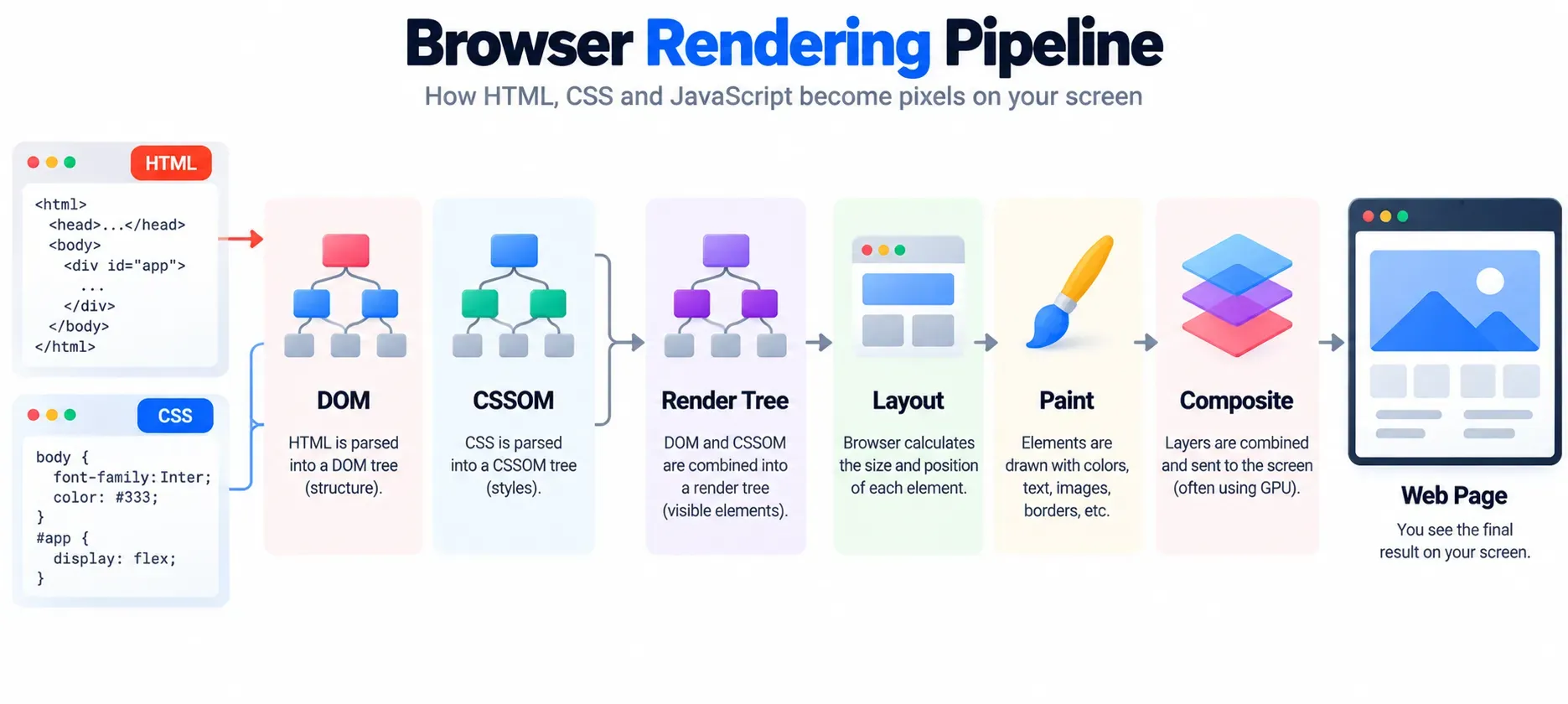
15. HTML Becomes the DOM
HTML provides structure.
Imagine the browser receives:
<h1>Running Shoes</h1>
<p>Lightweight shoes for everyday training.</p>
The browser does not simply display those characters exactly as received.
It parses the HTML and creates an internal representation called the Document Object Model, or DOM.
The DOM represents the document as a tree of nodes.
The heading becomes a node.
The paragraph becomes another node.
Elements can contain other elements, creating parent-child relationships.
That structure is incredibly important because JavaScript can interact with it later.
For example, a button can be connected to an event handler. A product title can be updated dynamically. A modal can be inserted into the document. An element can be removed or modified.
The DOM is therefore not just “the HTML.”
It is the browser's structured representation of the document.
This distinction is especially useful when debugging websites.
When a developer opens browser DevTools and inspects elements, they are looking at the browser's representation of the page, not simply reading the raw bytes that came over the network.
And HTML alone does not tell the browser exactly how everything should look.
For that, we need CSS.
16. CSS Becomes the CSSOM
HTML answers questions such as:
“What exists?”
CSS answers questions such as:
“How should it look?”
A stylesheet might say that headings should have a certain font size, products should appear in a grid, buttons should have padding, or a mobile layout should use fewer columns.
The browser parses the CSS into another internal representation commonly referred to as the CSS Object Model, or CSSOM.
The browser now has two important pieces of information.
It knows what the document contains.
And it has information about how that content should be styled.
The browser has to combine them.
This becomes more complicated than it sounds.
CSS has rules about inheritance, specificity, layout systems, media queries, positioning, stacking, visibility, and much more.
A tiny change in CSS can affect a surprising amount of the page.
Change the width of one container, and suddenly text wraps differently.
Text wrapping changes an element's height.
That pushes another element down.
That shifts an image.
That changes where a button appears.
A small style change can trigger layout work in other parts of the page.
And the browser is constantly trying to answer one enormous question:
“What should the user see?”
The answer comes through the rendering pipeline.
17. The Browser Builds the Render Tree
The DOM and CSSOM are not the final visual representation.
The browser uses them to determine what actually needs to be rendered.
The result is commonly described in terms of a render tree containing the information required to visually render the page.
Elements that are not rendered, such as certain hidden nodes, are treated differently from visible content.
Then comes layout.
The browser calculates positions and dimensions.
How wide is this box?
Where should this heading go?
How tall is the paragraph?
Where does the image start?
How many grid columns fit?
How does the layout change on a phone?
This process can involve a huge number of calculations for complex pages.
Once the layout is determined, the browser moves into painting.
Painting is where visual properties are turned into drawing operations.
Backgrounds.
Borders.
Text.
Shadows.
Images.
Gradients.
Then comes compositing, where different visual layers can be assembled efficiently by the rendering system and, depending on the browser and hardware, potentially handled with GPU acceleration.
This entire process is happening because the browser has to convert a document and style rules into actual pixels.
That is why “the browser displays the webpage” is such a deceptively simple phrase.
The browser is effectively running a small graphics and layout engine every time you open a modern website.
And JavaScript?
Well, JavaScript likes to complicate everything.
18. JavaScript Changes Everything
JavaScript is what can turn a document into an application.
Without JavaScript, many websites could still display static content.
With JavaScript, a page can respond to clicks, fetch new data, update components, animate interfaces, validate forms, open dialogs, change routes, display notifications, and communicate with APIs without reloading the entire document.
But JavaScript comes with a cost.
The browser must download the script.
Then it has to parse it.
Depending on the engine and situation, the JavaScript can be compiled and executed.
And the code can change the DOM or trigger other work.
Imagine a page loads, and the JavaScript immediately runs a large amount of computation before the user can interact.
The result may be a sluggish interface.
This is why frontend performance is not merely about making files smaller.
It is also about making sure the browser does not have too much work to do at the wrong time.
Techniques such as code splitting can divide a large JavaScript bundle into smaller pieces.
Lazy loading can delay resources until they are actually needed.
Hydration, in frameworks that use server-rendered HTML, can attach client-side behavior to already-rendered markup.
Client-side rendering can move more of the rendering work into the browser.
Each approach comes with trade-offs.
The goal is not to use the most fashionable rendering strategy.
The goal is to deliver the right experience for the application.
This is particularly important with frameworks such as React and Next.js.
But before we get there, there is another thing happening that many developers overlook.
The page is still collecting resources.
19. Images, Fonts, Scripts, and Other Resources
You thought one webpage meant one request.
Surprise.
It might mean dozens.
Or hundreds.
The browser reads the HTML and discovers that it needs a CSS file.
Then it finds a JavaScript bundle.
Then an image.
Then another image.
Then a web font.
Then an icon.
Then an analytics script.
Then perhaps a third-party chat widget.
Then an API call for product recommendations.
One page can become a small network explosion.
This is why opening a website in browser DevTools and looking at the Network tab can be so revealing.
You can watch requests appear like a stream of tiny conversations.
Some complete quickly.
Some take longer.
Some come from your own domain.
Others come from completely different domains.
Some are cached.
Some are downloaded from a CDN.
Some return HTML.
Some return JSON.
Some return images.
Some return JavaScript.
The browser has to coordinate all of this.
And resources can depend on other resources.
A stylesheet might affect how content is rendered.
A script might fetch additional data.
An image may take longer to download than the HTML itself.
A font might cause text rendering behavior to change after it arrives.
That means “the website has loaded” is not always one single moment.
There are multiple meaningful milestones.
The page can begin appearing.
Important content can become visible.
The page can become interactive.
Images can continue loading.
Third-party scripts can still be running.
Additional content can appear later.
This is one reason perceived performance can matter just as much as raw network speed.
A website that gives you useful content quickly can feel much faster than one that makes you stare at a blank screen while doing an enormous amount of work behind the scenes.
20. What Changes With React and Next.js?
This entire journey becomes especially interesting when the website is built using modern frameworks.
Consider React.
React lets developers describe user interfaces using components and declarative programming.
Instead of manually manipulating every DOM element, developers can describe what the interface should look like for a given state.
React then handles updating the actual DOM representation.
Next.js builds additional capabilities around React and can support multiple rendering strategies.
This is where terms such as SSR, CSR, SSG, ISR, streaming, and Server Components appear.
Server-Side Rendering, or SSR, means a server can generate HTML for a request and send it to the browser.
The browser can then begin rendering that HTML before all client-side JavaScript behavior is attached.
Client-Side Rendering, or CSR, moves more of the rendering work into the browser.
Static Site Generation, or SSG, generates pages ahead of time so they can often be served very efficiently.
Incremental Static Regeneration, or ISR, allows certain statically generated content to be updated over time without rebuilding the entire site.
Streaming allows parts of a response to become available progressively rather than forcing the user to wait for everything before receiving anything.
Server Components allow certain React components to execute on the server and keep some application logic away from the browser.
The important part is that these strategies change where work happens.
Some work happens before the response is sent.
Some happens in the browser.
Some can happen incrementally.
Some resources can be cached.
Others remain dynamic.
So when someone asks, “What happens when I open a Next.js website?” there is no single answer.
It depends on how the application is designed.
A product page built as a static page behaves differently from a personalized account dashboard.
A cached page behaves differently from a page requiring live database data.
This flexibility is powerful, but it also means developers need to understand the underlying web rather than thinking only in terms of framework abstractions.
A framework can change how the application is built.
It does not make DNS disappear.
It does not remove the network.
It does not eliminate HTTP.
The browser still has to receive something and turn it into pixels.
21. Why Some Websites Feel Instant
Now we reach the part users notice most.
Speed.
Two websites can contain similar information but feel completely different.
One feels instant.
The other feels like it needs time to reconsider its life choices.
Why?
Usually, performance comes from many small decisions working together.
Caching can eliminate unnecessary work.
A CDN can move resources physically closer to users.
Compression can reduce transfer sizes.
Images can be resized and delivered in efficient formats.
Browser caching can prevent repeat downloads.
Preloading can tell the browser which critical resource matters most.
Lazy loading can postpone things the user does not need yet.
Code splitting can prevent massive JavaScript bundles from arriving at once.
A database can use efficient indexes.
Backend services can avoid unnecessary work.
Servers can respond quickly.
Applications can stream useful content early.
None of these ideas alone guarantees a fast site.
The magic comes from combining them intelligently.
Imagine a user in Indore opening an e-commerce website whose infrastructure spans several countries.
A strong architecture might serve static assets from a nearby CDN edge, return cached resources from the browser, send a relatively small HTML response, load only the JavaScript needed for the current page, and query a highly optimized backend for the live product information.
The user experiences this as:
Tap.
Page.
Done.
Under the hood, dozens of carefully engineered decisions made that moment possible.
Performance is therefore less about making one giant optimization and more about reducing unnecessary work at every layer.
And then there is the ultimate stress test.
What happens when everyone wants the page at once?
22. What If One Million People Open the Website?
Imagine your website becomes extremely popular overnight.
Maybe a video about your product goes viral.
Maybe a celebrity mentions your company.
Maybe your application launches and everyone wants access at exactly the same time.
Yesterday, your website handled 100 visitors per minute.
Today, traffic suddenly explodes.
If everything depends on one machine, that machine may quickly become overwhelmed.
This is where scalability becomes important.
Instead of one server, the application may run on many servers.
A load balancer distributes requests.
A CDN handles static resources.
Caches reduce repeated work.
Databases may use replicas or other scaling strategies.
Queues can move expensive asynchronous work away from the critical request path.
Monitoring systems watch the infrastructure and alert engineers when something starts going wrong.
Sometimes the application scales horizontally by adding more instances.
Sometimes the database becomes the bottleneck.
Sometimes the cache becomes critical.
Sometimes the biggest problem is a third-party dependency.
Scaling is therefore not simply “buy a bigger server.”
It is an architectural challenge.
The system needs to continue performing as the number of users increases.
And this is where our simple URL starts looking almost comically small compared with the infrastructure supporting it.
One person sees a product page.
The engineering team sees an interconnected distributed system.
That is the hidden world behind the screen.
23. The Entire Journey in One Story
Let us go back to the original moment.
You are sitting at your computer.
You type:
https://example.com
You press Enter.
The browser first understands the URL and identifies the hostname.
It needs an IP address, so DNS resolution begins.
Perhaps the answer is already cached.
Perhaps the DNS resolver needs to contact authoritative infrastructure before returning the address.
Now the browser knows where the destination is.
Your packets begin traveling through networks toward that destination.
Depending on the protocol being used, the browser establishes the necessary transport connection.
For HTTPS, TLS then secures the communication and the browser verifies the site's certificate as part of establishing trust.
Now the browser sends an HTTP request.
Something conceptually like:
“GET the resource at / from example.com.”
The request may encounter a CDN.
If the requested content is cached at an edge location, the CDN can potentially answer immediately.
If not, the request can continue toward the origin infrastructure.
A load balancer may receive it and select an appropriate backend server.
The web server accepts the request.
The application processes it.
Middleware may check authentication, cookies, security rules, and validation.
The backend determines what the page requires.
Maybe it needs data from MongoDB.
Maybe it calls another API.
Maybe it checks inventory.
Maybe it calculates a price.
Maybe the user is logged in and receives personalized content.
The backend generates a response.
Headers are added.
Compression may be applied.
The response travels back.
The browser receives the HTML.
But the page still is not simply “done.”
The browser parses the HTML and creates the DOM.
It processes CSS and creates the CSSOM.
It determines which elements need to be rendered.
It calculates layout.
It paints the visual content.
It composites the final layers.
Meanwhile, JavaScript may be downloading, parsing, compiling, and executing.
Additional resources continue arriving.
Images appear.
Fonts load.
API requests return.
React may update parts of the interface.
A Next.js application may have involved server rendering, static generation, streaming, hydration, or Server Components depending on its architecture.
Eventually, what began as:
https://example.com
has become a complete visual experience on your screen.
And you?
You probably never notice any of it.
You click a button.
That triggers another HTTP request.
And the entire story starts again.
24. Final Thought: The Internet Is Hiding in Plain Sight
The next time you open a website, try to pause for one second.
Type a URL.
Press Enter.
Watch the page appear.
It is easy to think that the webpage simply “exists somewhere on the internet” and your browser retrieves it.
But that mental model leaves out almost everything interesting.
A domain name has to be resolved.
A destination has to be reached.
Networks have to carry packets.
A connection has to be established.
HTTPS has to protect the communication.
An HTTP request has to describe what is needed.
A CDN might answer.
A load balancer might route.
A web server might forward.
A backend might think.
A database might search.
Other services might respond.
The server might build HTML or JSON.
The response travels back.
Then the browser starts its own complicated process.
HTML becomes a DOM.
CSS becomes a CSSOM.
The browser calculates layout.
It paints.
It composites.
JavaScript executes.
More resources arrive.
The interface changes.
And finally, after all those layers of software and infrastructure cooperate, you see a webpage.
There is something beautifully strange about that.
A website feels like a simple object.
It is not.
It is closer to an agreement between hundreds of systems that all have to do their jobs well enough for one human to see a page without thinking about any of them.
And the most impressive part is not that a computer can perform all of this.
It is that modern websites can do it quickly enough that you press Enter and barely have time to blink before a full application is sitting in front of you.
So the next time someone says, “It’s just a website,” you can smile.
Because you know better.
There is a whole journey hiding behind that screen.
And all of it begins with a tiny thing:
A URL.
Frequently Asked Questions
What happens when you type a URL into a browser?
When you type a URL into a browser and press Enter, the browser parses the URL, resolves the domain name using DNS, establishes the necessary network connection, negotiates HTTPS security when applicable, and sends an HTTP request. The server-side infrastructure processes the request and sends a response back. The browser then parses the response, downloads additional resources such as CSS, JavaScript, images, and fonts, and renders the final page on the screen.
How does DNS find a website?
DNS translates human-readable domain names into network addresses such as IP addresses. A browser or operating system may already have the information cached. Otherwise, a DNS resolver can perform recursive lookups through DNS infrastructure, eventually reaching the authoritative DNS server for the domain. The resulting address is returned to the client so the browser knows where to send its request.
What happens after DNS resolution?
After DNS resolution, the browser knows the destination address and can begin communicating with the destination infrastructure. Depending on the protocols involved, it may establish a transport connection such as TCP or use a modern protocol such as QUIC. For HTTPS connections, TLS is negotiated to secure communication. The browser can then send its HTTP request to the website.
Why does a website use HTTPS?
HTTPS protects HTTP communication by using TLS. It helps provide confidentiality for the data being exchanged and allows browsers to verify the identity of the website through its digital certificate and trust chain. Without HTTPS, sensitive information could be exposed or modified more easily while traveling across networks.
How does a browser turn HTML into a webpage?
The browser parses HTML and creates the DOM, which represents the structure of the document. It also processes CSS into the CSSOM, combining structural and styling information to determine what should appear on screen. The browser then performs layout calculations, paints the visual content, and composites the resulting layers. JavaScript can modify the page and cause additional rendering work.
Why do some websites load faster than others?
Website speed depends on the entire chain involved in delivering and rendering the page. DNS performance, network latency, server processing, database queries, CDN caching, compression, image size, JavaScript execution, browser caching, and frontend rendering can all affect performance. A fast website generally minimizes unnecessary work and gets important content to the user as early as practical.
What role does a CDN play?
A CDN stores and serves cached resources from distributed edge locations. Instead of every user requesting static content from the origin server, the CDN can sometimes provide that content from an edge location closer to the user. This can reduce latency, lower pressure on the origin infrastructure, and improve the delivery speed of static resources such as images, stylesheets, scripts, and videos.
What happens when a website gets millions of visitors?
A high-traffic website usually needs architecture designed for scalability. Requests may be distributed across multiple application servers using load balancers. CDNs and caches can reduce repeated work. Databases may use replicas or other scaling techniques. Queues can move expensive background tasks outside the main request path. Monitoring and automated infrastructure management can help engineers detect and respond to failures or capacity problems.
The Bigger Picture
Understanding what happens when you open a website is useful because it changes the way you think about web development.
A slow page may not have a frontend problem.
A failed request may not have a backend problem.
A page that loads quickly may not have a single clever trick responsible for its speed.
Everything is connected.
The browser, DNS, transport protocols, TLS, HTTP, networks, CDNs, servers, application code, databases, APIs, caches, and rendering engine all participate in the experience.
You do not need to become a network engineer, database specialist, browser-engine developer, and infrastructure expert just to build websites.
But knowing what happens between the URL and the screen gives you a much better mental model.
And that mental model is one of the most valuable tools a web developer can have.
Because when you understand the journey, you stop seeing a website as a page.
You start seeing the system behind it.
And suddenly, that innocent little Enter key does not look quite so innocent anymore.