How Netflix Handles Millions of Requests (Simplified Architecture)
Discover how Netflix handles millions of requests using a scalable architecture built on microservices, CDNs, caching, and auto-scaling—explained in a simple and easy-to-understand way.

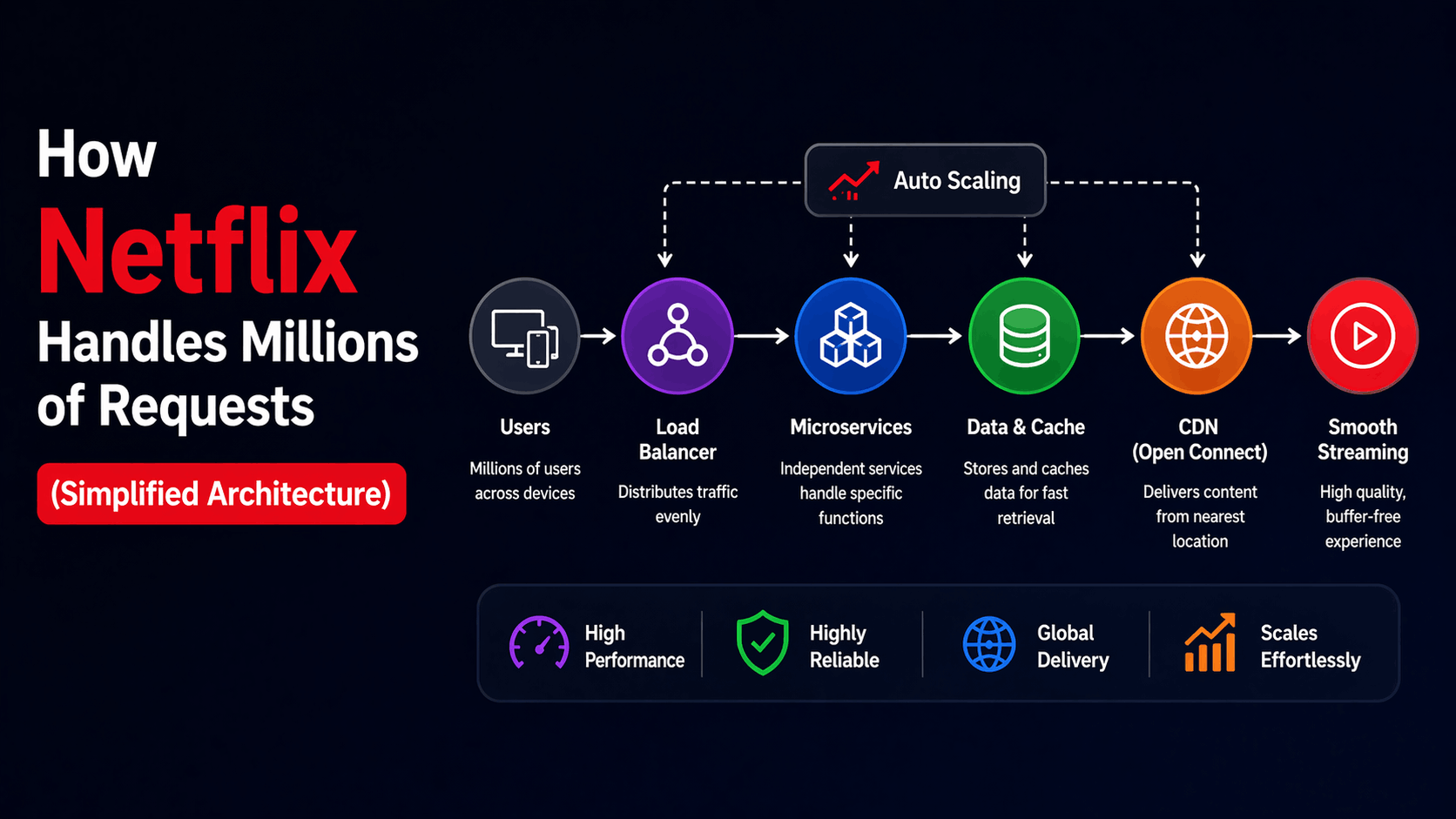
If you’ve ever opened Netflix and instantly started streaming your favorite show without buffering, you’ve already experienced one of the most powerful distributed systems in the world. Behind that smooth “click and play” experience lies an architecture designed to handle millions of users simultaneously, across different devices, locations, and network conditions.
At first glance, it might feel like magic. But once you break it down, Netflix’s system is actually a combination of smart engineering decisions, clever trade-offs, and relentless focus on performance and reliability.
In this guide, we’re going to simplify how Netflix handles massive traffic, without turning it into a confusing system design lecture. By the end, you’ll understand not just what Netflix does—but why it works so well.
The Real Problem Netflix Solves
Before we jump into architecture, let’s understand the real challenge.
Netflix isn’t just serving videos. It’s serving:
- Millions of concurrent users
- Different video qualities (480p → 4K)
- Personalized recommendations
- Instant playback with minimal delay
And all of this needs to work globally, 24/7, without crashing.
If even a small part fails, users notice immediately. Nobody tolerates buffering anymore.
So the goal isn’t just performance. It’s a consistent performance at scale.
The Big Picture: What Happens When You Click “Play”
Let’s simplify the flow.
You open Netflix, scroll through recommendations, and click on a show.
At that moment, multiple things happen in parallel:
- Your request goes to Netflix servers
- Your profile data is fetched
- Recommendations are calculated
- Video metadata is retrieved
- Streaming starts from the nearest location
And this entire process happens in milliseconds.
Netflix achieves this by splitting responsibilities across multiple systems instead of relying on one big server.
Microservices: The Backbone of Netflix
Netflix doesn’t use a single backend. Instead, it uses hundreds of small services.
This approach is called microservices architecture.
Each service has one job:
- User service → handles accounts
- Recommendation service → suggests content
- Playback service → manages streaming
- Billing service → subscriptions
This separation makes the system flexible.
If one service fails, the entire platform doesn’t go down. That’s a huge advantage at scale.
Why Netflix Moved to the Cloud
Netflix wasn’t always this scalable.
Back in the day, they used traditional data centers. But after a major outage, they realized something important: scaling physical infrastructure isn’t enough.
So they moved to Amazon Web Services.
This decision changed everything.
Instead of managing servers manually, Netflix could now:
- Scale automatically based on demand
- Distribute traffic globally
- Recover quickly from failures
This is one of the biggest reasons Netflix can handle millions of users without breaking.
Content Delivery Network (CDN): The Real Hero
Here’s where things get interesting.
Netflix doesn’t stream videos directly from its main servers.
Instead, it uses a Content Delivery Network (CDN) called Open Connect.
Think of it like this: instead of one central warehouse, Netflix places mini storage units around the world.
When you press play, your video comes from the nearest server—not from a distant location.
This reduces:
- Latency
- Buffering
- Load on central systems
This is why your video starts almost instantly.
Caching: Speed Without Extra Work
Netflix avoids unnecessary work by aggressively caching data.
If millions of users are watching the same show, Netflix doesn’t fetch it repeatedly. It stores it closer to users.
Caching happens at multiple levels:
- API responses
- Metadata
- Video chunks
This dramatically reduces system load.
Instead of recomputing everything, Netflix reuses existing data.
Load Balancing: Handling Traffic Smartly
Now imagine millions of users logging in at the same time.
If all requests hit a single server, it would crash instantly.
This is where load balancing comes in.
Load balancers distribute traffic across multiple servers, ensuring no single system gets overwhelmed.
It’s like having multiple checkout counters instead of one long line.
Auto Scaling: Handling Traffic Spikes
Netflix traffic isn’t constant.
It spikes during:
- Evenings
- Weekends
- New releases
Instead of keeping as many servers running at all times (which is expensive), Netflix uses auto-scaling.
When traffic increases, more servers spin up automatically. When traffic drops, they scale down.
This keeps performance high and costs optimized.
Fault Tolerance: Expecting Failures
Netflix assumes that failures will happen.
Instead of trying to prevent every failure, they design systems that survive failures.
They even built tools like Chaos Monkey, which randomly shut down services to test system resilience.
If your system can survive random failures, it can survive real ones too.
Data Management: Handling Massive Information
Netflix handles enormous amounts of data:
- User behavior
- Watch history
- Recommendations
- Logs
They use distributed databases to store and process this data efficiently.
Instead of relying on a single database, data is spread across multiple systems to avoid bottlenecks.
Personalization: Why Netflix Feels Smart
When you open Netflix, it doesn’t show the same content to everyone.
It uses machine learning to personalize recommendations.
This involves:
- Tracking what you watch
- Analyzing patterns
- Predicting preferences
All of this happens in real-time, without slowing down the app.
Streaming Optimization: Smooth Playback
Netflix doesn’t send a single large video file.
It breaks videos into small chunks and adjusts quality dynamically based on your internet speed.
If your connection is slow, it lowers the quality to avoid buffering.
If your connection improves, the quality upgrades automatically.
This is why Netflix feels smooth even on unstable networks.
Frontend + Backend Coordination
Netflix isn’t just backend magic.
The frontend plays a huge role in performance.
It:
- Minimizes unnecessary requests
- Uses lazy loading
- Optimizes rendering
This ensures the UI feels fast, even before data fully loads.
What You Can Learn From Netflix
You don’t need Netflix-scale systems to apply these ideas.
Even small apps can benefit from:
- Splitting logic into services
- Using caching
- Handling failures gracefully
- Optimizing API calls
The goal isn’t complexity. It’s a smart design.
Final Thoughts
Netflix doesn’t rely on one breakthrough technology.
Its strength comes from combining multiple strategies:
- Microservices
- Cloud infrastructure
- CDN distribution
- Caching
- Auto scaling
Each piece solves a specific problem, and together they create a system that feels effortless to users.
And that’s the real lesson.
Great systems don’t just work—they work consistently, even under pressure.